
Download Serious Samurize – system monitor, desktop monitor, customizable monitor, real-time system data, taskbar monitor
Overview
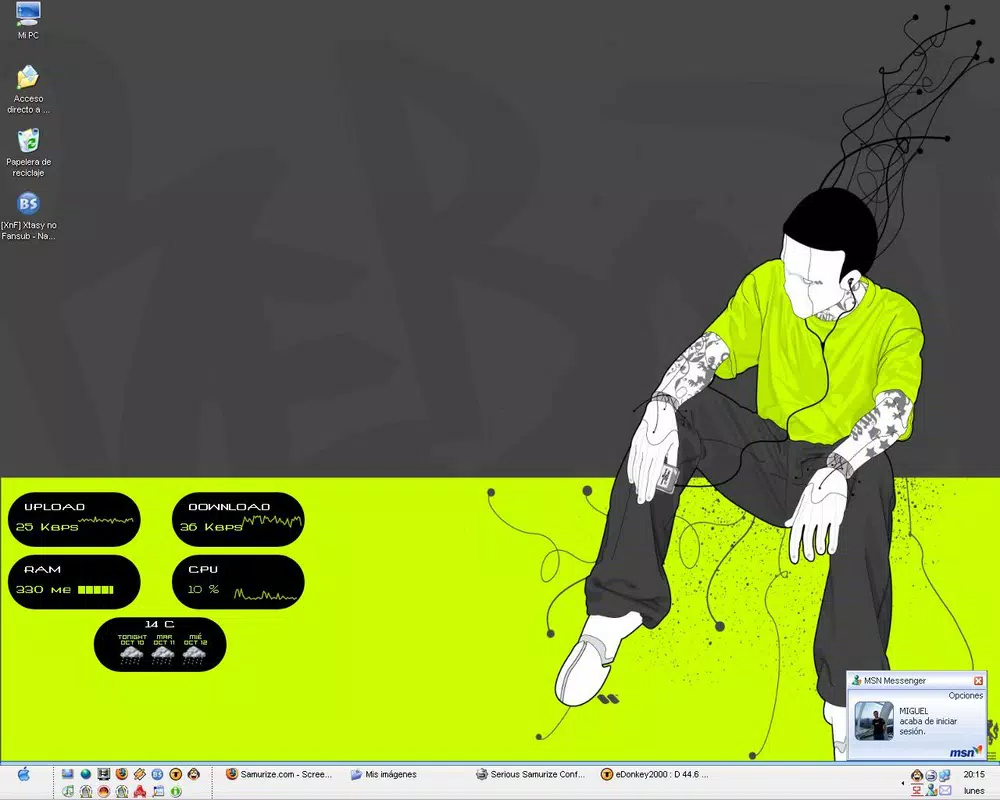
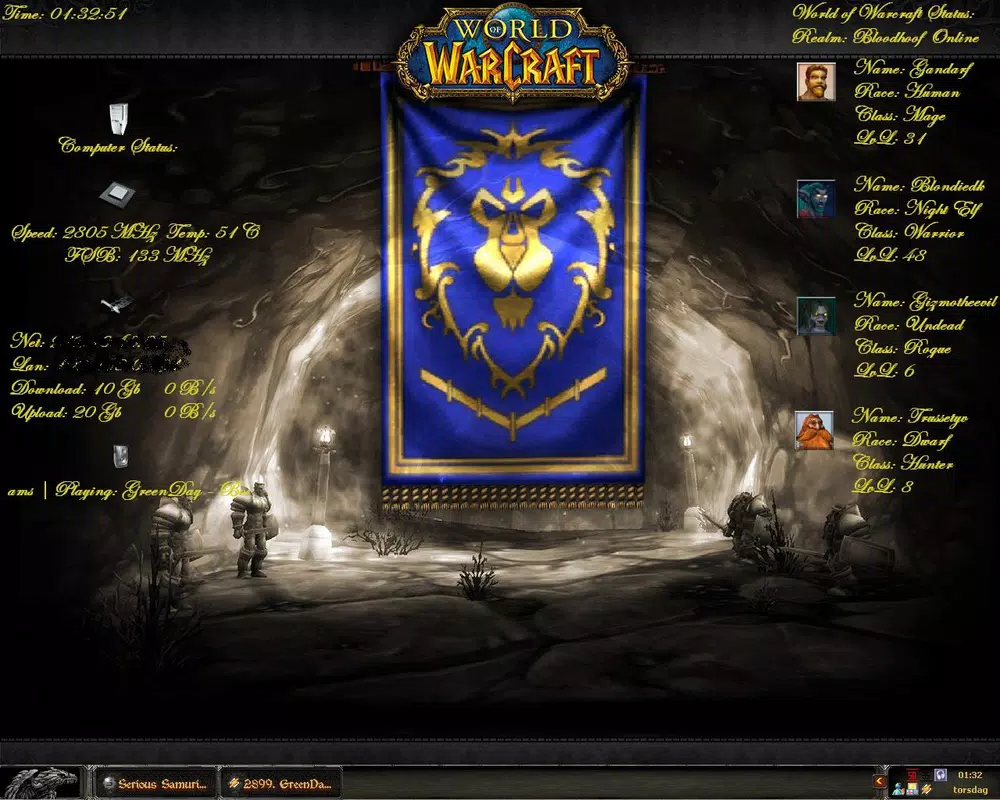
Serious Samurize is a system monitoring utility designed for Windows users seeking detailed, real-time insights into their computer’s performance. As a fully customizable system monitor, it enables users to assemble and design personalized monitoring panels that display critical system metrics directly on the desktop, taskbar, or homepage. The app serves as a powerful tool for tracking CPU usage, disk utilization, network traffic, and system temperatures, offering immediate visibility into hardware and software activity. This functionality is particularly valuable for users managing resource-intensive tasks such as gaming, video editing, or software development, where system stability and responsiveness are crucial.
Targeted at both advanced users and those new to system monitoring, Serious Samurize balances technical depth with visual flexibility. Its ability to adapt to individual aesthetic preferences makes it suitable for users who value both functionality and design harmony in their digital workspace. The application plays a notable role in the Windows system utilities ecosystem by providing a lightweight yet robust alternative to built-in performance tools. While the developer did not provide additional technical details, the app’s longevity since its 2007 release suggests reliability and sustained user interest. Real-world use cases include diagnosing performance bottlenecks, optimizing system configurations, and maintaining long-term system health through continuous monitoring.
Key Features & Functionality
- Comprehensive Monitoring Options: Serious Samurize tracks a wide range of system parameters including CPU load, disk I/O, network activity, and temperature readings. This allows users to monitor hardware health and performance in real time, making it ideal for troubleshooting or optimizing system behavior during intensive workloads.
- Highly Customizable Interface: Users can position monitoring panels on the desktop, taskbar, or homepage and adjust transparency, size, and layout. This flexibility enables the creation of a personalized dashboard that aligns with individual workflow and visual preferences.
- Real-Time System Information: The software continuously updates displayed metrics, ensuring users receive immediate feedback on system status. This is especially useful during high-demand operations such as rendering, compiling, or streaming, where resource spikes can impact performance.
- Visual Customization & Aesthetic Integration: Panels can be styled with various visual elements, including fonts, colors, and graphical overlays. This allows users to blend system data seamlessly into their desktop environment, enhancing both usability and visual appeal.
- Configurable Data Display: Advanced users can define custom triggers, thresholds, and alerts based on system metrics. This feature supports proactive monitoring, enabling users to detect anomalies before they lead to system instability.
For example, a developer might use Serious Samurize to monitor CPU and memory usage while compiling code, ensuring that no process exceeds safe limits. Similarly, a gamer could track GPU and network performance during online matches to identify lag sources. The app’s adaptability ensures it remains relevant across diverse technical and creative workflows.
Interface, UX & Performance
Serious Samurize features a modular interface that allows users to arrange monitoring elements according to personal preference. The layout supports drag-and-drop configuration, enabling intuitive panel assembly. Navigation is straightforward, with a central settings panel that controls all visual and functional aspects of the monitor. The visual style emphasizes clarity and minimalism, with options to toggle between plain data displays and more elaborate, animated designs.
Although the developer did not list formal performance metrics, the app’s lightweight file size of 1.2 MB suggests efficient resource usage. It operates with minimal impact on system performance, making it suitable for use on older or lower-spec machines. The application remains responsive across different screen resolutions and windowing environments, maintaining stability during extended use. Users report consistent updates and smooth rendering of data, even when multiple metrics are displayed simultaneously.
Responsiveness is maintained through optimized background processes, ensuring that monitoring data is refreshed without introducing lag. The app does not require frequent restarts or system recalibrations, contributing to a stable and reliable user experience. While the learning curve may be steeper for beginners due to the depth of customization options, the interface remains accessible through clear labeling and logical grouping of settings.
Platform Compatibility & Technical Requirements
Serious Samurize is designed exclusively for the Windows platform. It is compatible with Windows operating systems, though specific version requirements were not listed by the developer. The app has a file size of 1.2 MB, indicating a lightweight footprint that should not strain storage or memory resources.
Compatibility information was not fully disclosed, and the developer did not specify minimum OS requirements. As such, users should exercise caution when installing on newer or less common Windows variants. The app’s release date of August 1, 2007, suggests it may not support the latest Windows features or security protocols without potential workarounds. However, its continued availability indicates ongoing support for legacy environments.
Pros and Cons
Pros
- Highly customizable monitoring panels for personalized system oversight
- Real-time data updates for immediate system feedback
- Lightweight design with minimal impact on system resources
- Supports multiple display locations: desktop, taskbar, homepage
- Flexible visual styling to match user preferences and desktop themes
Cons
- Specific OS compatibility details were not provided
- May require technical knowledge for full customization
- No official updates since 2007, raising concerns about modern security support
- Limited documentation or user guides available
- Price point of $19.95 may be considered high for a long-unupdated utility
FAQ
Is Serious Samurize compatible with modern Windows versions?
The developer did not specify minimum OS requirements. While the app was released in 2007, it may run on current Windows systems through compatibility modes or emulation, though this is not guaranteed.
Can I use Serious Samurize on multiple devices?
Information regarding licensing or multi-device use was not provided. Users should consult the official source for licensing terms.
Does Serious Samurize require internet access?
Based on available data, the app does not appear to require an active internet connection for core functionality. However, no official statement confirms this.
How often does Serious Samurize update its system data?
The software provides real-time monitoring, meaning data is updated continuously as system metrics change. The refresh rate is optimized for responsiveness without overloading the system.
Is Serious Samurize safe to download and install?
As a long-standing utility from Serious Software, the app is generally considered safe. However, users should download from trusted sources to avoid potential risks associated with outdated software.
Final Thoughts
Serious Samurize stands as a durable, feature-rich system monitor tailored for users who demand granular control over their system’s performance data. Its ability to deliver real-time insights with a high degree of visual and functional customization makes it a compelling choice for both technical enthusiasts and professionals managing demanding workflows. While the lack of recent updates and unclear compatibility with modern systems may raise concerns, its lightweight design and proven functionality continue to support its relevance in niche environments.
For users seeking a reliable, customizable desktop dashboard to track CPU usage, disk utilization, network traffic, and system temperatures, Serious Samurize offers a unique blend of practicality and personalization. Its value lies in its ability to transform raw system data into an intuitive, visually coherent display that enhances both productivity and system awareness.
Download Serious Samurize now


